A parent asks what day it is for the third time that morning. An appointment has been moved, but the paper note on the kitchen counter still shows the old time. A family member wants to send reassurance without expecting a loved one to open an app. These are small moments individually, yet managing them can take considerable attention throughout the day.
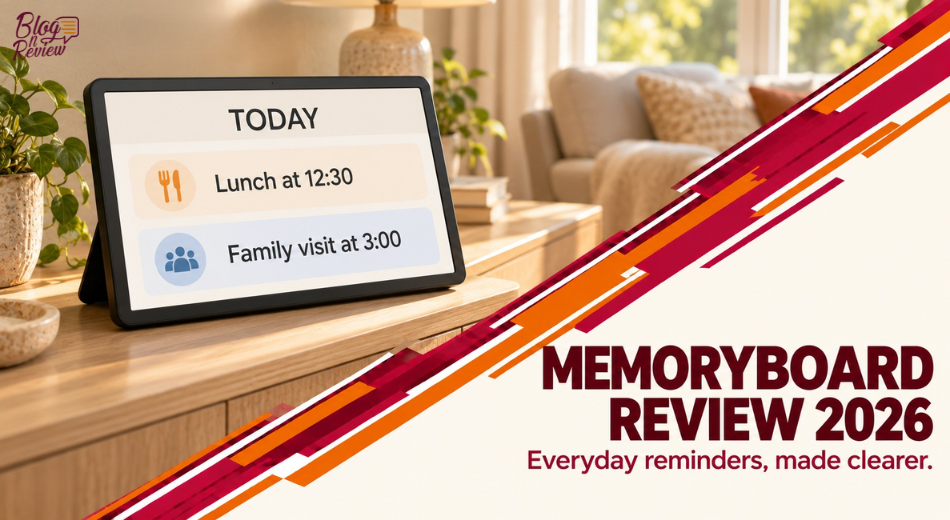
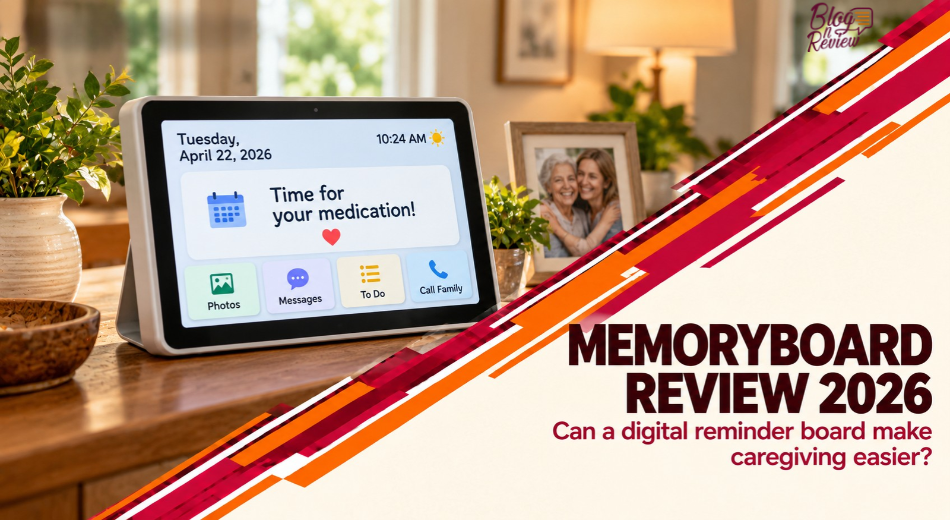
This Memoryboard review looks at a digital display designed to show the day, date, reminders and personal messages without requiring the person receiving them to navigate a phone. The idea is appealing, but usefulness depends on more than a large screen. Can the person notice and understand the messages? Is the internet connection dependable? And does the extra convenience justify buying a dedicated device instead of using a clock, paper calendar or existing tablet?
We examine the 10.1-inch and 15.6-inch models, the caregiver app, current prices, customer feedback and practical alternatives. This is a research-based assessment of published information and user reports; we have not tested either model in a home or measured its effect on caregiving.
Memoryboard at a Glance
Quick verdict: Worth considering for families who want a simple shared display and can manage its setup.
Best for: Care partners who want to send short reminders and photos to someone who can still notice and understand a screen.
Advantages: Remote updates, no required subscription, two screen sizes and a display designed for passive viewing.
Limitations: Requires power and compatible Wi-Fi, shows content one item at a time and cannot confirm that a person has read or acted on a reminder.
Overall assessment: A focused communication aid, not a substitute for individualized care. We have not assigned a numerical score because we have not independently tested the device or its clinical effects.
Explore a Simpler Way to Share Reminders
Compare the two screen sizes, current prices and return terms with the needs of the person who will use it.
Explore Memoryboard →What Is Memoryboard?
Memoryboard is a dedicated digital message display intended to help families share reminders, photos and reassuring notes with an older adult or another person who could benefit from a visible routine. A caregiver uses a mobile app to send content; the recipient can view it without routinely operating the app. The company identifies Tyler Zanini and David Meckler as co-founders and describes the product as originating from a family experience with memory loss. Read Memoryboard’s company story.
The product sits somewhere between a large-print day clock and a connected photo frame. Its main appeal is that family members can update a display remotely while the person at home receives a relatively uncomplicated visual prompt. It is not described here as a medical device or a treatment for dementia; a familiar message may be useful without changing the underlying condition.
That distinction matters when setting expectations. A board can present information, but someone may overlook it, misunderstand it, or need a different kind of support on a particular day. The Alzheimer's Association notes that written reminders, clocks and photographs may help when they remain meaningful to the person. The appropriate approach depends on the individual and their preferences. Alzheimer’s Association guidance.
Key Features: What Can the Memoryboard Digital Calendar Do?
Day, date and short messages
Memoryboard combines time-orientation information with space for messages sent by family or other invited caregivers. A short note might identify a planned visit, name the person who is arriving or provide a friendly greeting. For someone who repeatedly looks for the same information, a visible message can make an answer easier to find than a note that has been moved or a call that has already ended.
The company says the recipient does not need to tap or navigate for messages to appear. That is a useful design goal when learning another interface would be frustrating, although the display still requires attention. Position and contrast matter as much as screen dimensions: a beautifully written message cannot help if it is placed where the person rarely looks. See how Memoryboard describes the process.
Photos and a shared Care Circle
Family members and other invited contributors can use the Care Circle to send photos and notes. Memoryboard says there is no limit on invited contributors or the number of messages and photos, and its app does not require a subscription. This can make participation easier for a family spread across different locations, provided someone coordinates what is posted. Read the subscription FAQ.
Scheduling and message rotation
The scheduling guide describes one-time and repeating posts, specific display windows and overnight scheduling. It says messages generally expire at the end of the day unless scheduled to repeat, and that caregivers should enter the time in the board’s local time zone. If contributors live in different time zones, this is an especially important detail to check before saving a post. Read the scheduling guide.
Memoryboard’s help center says one photo or message appears at a time. Overlapping items rotate in a carousel, with display durations configurable from 10 seconds to 10 minutes; text messages are limited to 140 characters. Those limits encourage concise posts but can also mean a particular reminder is not continuously visible when several are scheduled together. Confirm the timing on the screen itself before relying on a busy schedule. Review the content-display details.
Memoryboard 10.1 Review: A Compact Display for Nearby Viewing
The smaller model is intended for spaces such as a bedside table or kitchen counter. That placement can work well when the person spends time near one familiar surface and has a clear sightline to the display. A compact board is also easier to fit into a room that already has photographs, a lamp and other everyday objects.
At $175 when the company’s product listing was checked, the 10.1-inch model costs less than the larger version. The lower price does not necessarily make it the better value: if the screen needs to be viewed from across a room, insufficient visibility could undermine the entire purchase. Before buying, consider the intended viewing distance, lighting and the individual’s vision rather than relying on screen size alone.
Memoryboard 15.6 Review: When Is the Larger Screen Worth It?
The 15.6-inch Memoryboard is presented as the larger option for living rooms or shared spaces. At the time of research, its listed price was $275, $100 more than the smaller model. Memoryboard says both sizes use the same app and offer the same core features, so the additional spending primarily buys a larger display rather than a different service tier. Compare the official model listings.
The larger model may be sensible when text needs to be seen from farther away or when there is room for a more prominent screen. However, size alone does not guarantee readability for a person with low vision. Room lighting, glare, text length and individual visual needs all affect the experience. Check the actual placement during the return window instead of assuming that bigger will solve every visibility issue.
First Impressions and Setup: What the Specifications Tell Us
The published specifications describe 1920 × 1080 displays, an included stand and power adapter, and compatibility with iOS and Android caregiver apps. Both devices require continuous mains power; there is no battery. Wall mounting is listed as an option, with mounting hardware not included. We cannot assess packaging, build quality or setup speed from personal experience. View the hardware specifications.
Internet compatibility is the most important technical check. Memoryboard says the device connects to 2.4 GHz Wi-Fi and cannot connect to a 5 GHz-only network. A combined network name may work, but if setup proves difficult, check the router and seek help before assuming the display is faulty. The caregiver also needs a compatible phone or tablet for the app.
Think about the whole setup before choosing a location: an outlet, safe cord routing, reliable signal, comfortable viewing angle and a surface where the board is unlikely to be knocked over. Some care facilities have network rules that make personal devices harder to connect. Ask the facility about its Wi-Fi and device policies before ordering.
Performance and Practical Use: What Can a Reminder Board Actually Do?
Supporting a routine
A recurring reminder can be helpful when a person already recognizes a routine and benefits from seeing the next step. A message about a family visit, for example, can be updated if the plan changes. A familiar photograph or greeting may provide a welcome personal connection, particularly when relatives live far away.
The caregiver’s work does not disappear: someone still needs to create, review and update the messages. Begin with a small number of clear posts, then observe with the person whether they are useful or distracting. If a schedule changes, make sure old messages are removed or revised; conflicting instructions can create the very confusion the board was intended to reduce.
Where the approach may fall short
Some people may not look at the screen, may find changing messages unsettling or may prefer a familiar paper clock and direct conversation. Reading ability and attention can also change. Reddit discussion located for this review included caregivers questioning whether a person would notice a board and suggesting that a simpler clock could be adequate; those comments are individual perspectives, not proof that a particular device will fail. Read the caregiver discussion.
A displayed message cannot confirm that the person has understood it or completed a task. Avoid treating it as the sole safeguard for medication, emergencies, wandering risks or other time-sensitive care. Agree on a separate plan with the relevant caregiver or healthcare professional. The Alzheimer’s Association recommends pairing supportive technology with regular check-ins. Read technology safety guidance.
Connectivity and privacy
The manufacturer says Wi-Fi is needed to receive new messages and photos. Do not assume that a post sent during an outage has arrived or that offline behavior will match your expectations; confirm the current behavior with support and use an alternative communication plan when connectivity is unreliable. Power is another dependency, so place the adapter where it will not be accidentally disconnected.
Care Circle access also deserves a family discussion. Decide who may post, avoid displaying sensitive personal details unnecessarily and consider who else can see the screen. A board placed in a shared care facility may be visible to visitors or staff. Review the privacy policy and invitation settings before adding personal photos or information.
Pricing and Value: Is Memoryboard Worth It?
The official collection page listed the 10.1-inch Memoryboard at $175 and the 15.6-inch version at $275 when researched in October 2026. These are product prices, not guaranteed checkout totals; taxes, shipping and promotions can change. The company says there is no required subscription, which makes the initial device price the main stated product cost rather than an ongoing software membership.
| Model | Listed price | Best starting point |
| 10.1-inch | $175 | Nearby viewing and smaller surfaces |
| 15.6-inch | $275 | More prominent placement and longer viewing distances |
Value depends on the problem you are trying to solve. A basic day clock may be enough when the main need is seeing the date and time. A whiteboard is inexpensive and easy to change in person. Memoryboard becomes more compelling when relatives need to update short messages from different locations and the recipient benefits from an automatically changing display.
The company’s help center describes a 120-day return period for eligible devices purchased directly from Memoryboard, prepaid return shipping and a two-year limited hardware warranty. It says returns should include the original accessories and meet condition requirements. Purchases from other sellers follow that seller’s return process. Read the current policy before ordering, particularly for international shipping or a care-facility delivery. Read the return and warranty summary.
Compare the Two Memoryboard Sizes
Check the latest price, display dimensions and return conditions before choosing the best location for the screen.
View Memoryboard Options →Memoryboard Pros and Cons
| Pros | Cons |
| Short messages and photos can be sent remotely | Requires ongoing access to power and compatible Wi-Fi |
| Recipient can view updates without operating the caregiver app | A message being displayed does not prove it was read |
| Two sizes share the stated core features | Larger screen costs more and needs more room |
| No required subscription according to the company | Dedicated device costs more than a basic clock or paper board |
| Direct-purchase return period gives families time to assess fit | One-at-a-time content rotation requires thoughtful scheduling |
Who Should Buy Memoryboard?
The strongest candidate is a family that wants to share brief, changing information remotely with someone who can still recognize the display and understands its messages. It may be especially relevant when relatives coordinate across households and cannot easily update a paper note in person. The caregiver should be comfortable managing the app and checking that the network remains connected.
Include the intended user in the decision whenever possible. Their preferences about a screen, photographs, sounds and where it sits matter as much as a family member’s assessment of convenience. A trial is most informative when the person has time to experience a modest number of messages in their normal environment.
| Need | Recommendation |
| Remote family messages and a simple viewing experience | Consider Memoryboard |
| Only a large day and date display | Compare a basic day clock first |
| A shared household calendar with interactive tasks | Compare a smart calendar |
| Photo sharing is the main goal | Compare a digital photo frame |
| Urgent safety monitoring or proof a task was completed | Use a separate appropriate care plan |
Who Should Avoid It?
The board may be a poor fit when the intended user is uncomfortable with screens, no longer finds written prompts meaningful or is unlikely to notice a display. A family with unreliable internet, a 5 GHz-only network or no convenient power outlet should resolve those issues first. If a facility cannot connect the board to its network, a non-connected alternative may be more practical.
Shoppers who want a full-featured tablet, video calls or confirmed medication adherence should check whether another product meets those requirements. The sources reviewed support a message-and-photo display, not a guarantee that every desired feature is available. Ask the company about any essential feature before buying instead of assuming it behaves like a general-purpose device.
Memoryboard Reviews: Customer Feedback and Common Concerns
The brand’s own product pages feature favorable customer stories about reminders and communication. Because those are displayed on a seller-controlled website, they should be read alongside independent sources. The Apple App Store page checked showed a 4.9/5 app rating from 108 ratings; that is a rating of the app, not an independent durability score for the hardware or a representative survey of every purchaser. See App Store feedback.
Independent app comments describe appreciation for remote family communication and simple viewing. A Google Play reviewer also requested more flexible scheduling and desktop management; the developer replied that improvements were being developed. Because app features change, treat an older request as feedback from that time, not proof that the same limitation persists today. See Google Play feedback.
Searches for Memoryboard reviews on Reddit reveal questions and mixed expectations from caregivers, including concern that some people may not look at a display. That is useful context, but online discussion does not replace a hands-on assessment with your own family. The most relevant feedback identifies the living situation, who manages the app, and how the recipient responds over time.
Memoryboard vs. Alternatives
| Option | Main strength | Key consideration |
| Memoryboard | Remote short messages and photos for passive viewing | Power, Wi-Fi and a caregiver-managed app are needed |
| Basic day clock or whiteboard | Simple and often inexpensive | Usually needs someone present to update information |
| Skylight Calendar | Shared scheduling, calendar sync and interactive organization | A busier calendar may be less suitable for someone who needs one simple prompt |
| Aura digital photo frame | Family photo sharing without a required subscription | Primarily a photo frame; check reminder features separately |
A Skylight Calendar is designed around a shared calendar and tasks, making it a more natural comparison for a household that wants interactive organization. Aura emphasizes sharing photos and videos. Neither should be assumed to duplicate Memoryboard’s reminder workflow; compare the current features and any paid upgrades before ordering. Skylight Calendar features; Aura frame details.
Frequently Asked Questions
Is Memoryboard legit?
Memoryboard has an operating website, published product specifications, an app and stated support and return policies. Those are useful signs of an established purchasing route, but they do not guarantee that the product will suit every family. Review the current terms and use the official site or a seller you trust.
Is Memoryboard suitable for someone with dementia?
It may be useful for a person who can still notice, read and understand the prompts, but abilities and preferences vary. A display is a supportive communication tool, not a dementia treatment or a replacement for individualized care. Involve the person and their care team when deciding whether it fits their routine.
What is the difference between the 10.1-inch and 15.6-inch Memoryboard?
Memoryboard says both models use the same app and offer the same core features. The main difference is display size: the smaller version may suit a nearby surface, while the larger one may be easier to see from farther away. Compare placement and the person’s actual visual needs before choosing.
Does Memoryboard require a subscription?
The company says no subscription is required: the device is a one-time purchase and the caregiver app is free. Check current terms and any shipping or tax charges when ordering. Internet service and a compatible phone or tablet are separate requirements.
Does Memoryboard need Wi-Fi?
Yes. Memoryboard says a 2.4 GHz Wi-Fi connection is required to receive messages and photos and that it cannot connect to a 5 GHz-only network. Check connectivity at the intended location, including care facilities. Confirm current offline behavior with support before depending on scheduled messages.
Does the person receiving messages need a smartphone?
Memoryboard says the recipient can view messages without downloading an app or routinely tapping the screen. A caregiver or family member needs a compatible device to set up and manage content. The recipient’s ability to notice and understand the display still determines whether it is useful.
Can several relatives send messages?
Yes. Memoryboard says an unlimited number of people can be invited to the Care Circle to share messages and photos. Agree on who manages schedules and changes so the board does not present outdated or conflicting information. Only invite people whose access the user and care team are comfortable with.
Can Memoryboard confirm that someone took medication?
A displayed reminder alone does not establish that it was seen, understood or acted upon. Do not use the board as the only safeguard for medication or other critical tasks. Discuss an appropriate medication-support plan with the person’s healthcare professional and caregivers.
What is Memoryboard’s return policy?
The company describes a 120-day return window for eligible devices purchased directly from its website, with a prepaid return label and conditions concerning working condition and included accessories. Third-party purchases follow the seller’s policy. Read the current terms and contact support before returning an item.
What do Memoryboard reviews on Reddit say?
The discussion found for this review includes caregivers asking whether a connected screen would be useful and expressing concerns that some people may not notice it. Others mention simpler clocks as alternatives. These are individual opinions, not a representative study or proof of how the device will perform for a particular person.
Final Verdict: Is Memoryboard Worth Buying?
Memoryboard offers a focused approach to a real caregiving challenge: keeping brief, relevant information visible while allowing family members to update it from elsewhere. The choice between its two sizes is primarily about placement and readability, and the lack of a required subscription simplifies the cost comparison.
The strongest reason to buy is a clear fit between the device and the person’s existing habits. If they welcome a screen, recognize written reminders and have reliable connectivity, it may be a useful addition to the family’s routine. If they prefer a familiar clock, rarely look at screens or need confirmed support for essential tasks, a different approach may be better. Treat the board as one communication aid within a broader care plan.
Find the Right Fit for Your Family
Review the current model details and return policy, and consider where the display will be easiest for your loved one to see.
Visit Memoryboard →