It starts with a small question. What time is the appointment? Is anyone visiting today? Has the plan changed? For families supporting an older parent or someone who has difficulty remembering daily details, these questions can arrive again and again. Answering them is an act of care, but repeated phone calls, missed messages and confusing calendars can make even ordinary days feel more complicated than they need to be.
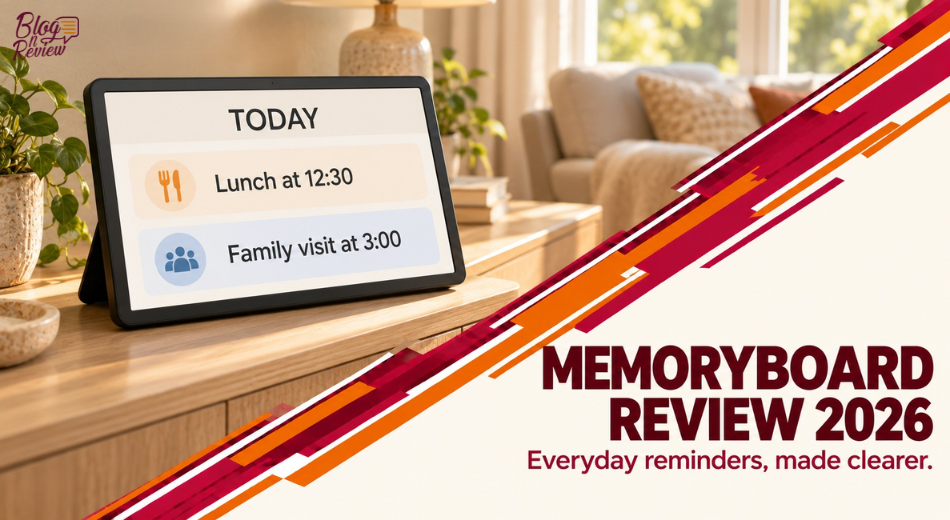
Memoryboard is designed around a refreshingly simple idea: put the answer somewhere familiar and visible, and let trusted family members update it from their phones. Unlike a tablet that asks its user to navigate apps and notifications, the display is intended to show reminders, family photographs and reassuring notes automatically. The person looking at it does not have to learn a new interface.
That promise makes Memoryboard particularly interesting for long-distance families, assisted-living residents and caregivers who need a shared way to communicate. But is it worth buying? Which of the two sizes makes more sense? What happens without Wi-Fi, and how does it compare with a paper calendar, digital photo frame or smart display? This independent, research-based review examines the product, setup, pricing, customer experiences and important limitations before you buy.
Compare the compact bedside model with the larger shared-room display and choose based on where the person will actually see it.
See Memoryboard Models →What Is Memoryboard?
Memoryboard is a dedicated digital message and reminder display designed to support communication between an older adult or loved one and the people who care about them. A caregiver or family member uses the companion mobile app to send updates; those updates appear on the connected display in the recipient’s home. The device is designed to stay plugged in and connected to Wi-Fi.
The company's story is rooted in its founders' family experience with memory loss. Its aim is not to add another complicated gadget to the household, but to create one dependable place for everyday information. The brand markets the display for people who may struggle with phones or apps, including some people living with dementia, as well as families who simply want a calmer communication routine.
It is important to distinguish a reminder aid from a medical treatment. Memoryboard cannot diagnose, prevent, slow or cure dementia, and it cannot ensure someone has followed an instruction. It is a tool for communication and orientation, not a replacement for supervision, medical care or emergency response.
How Memoryboard Works: The Simple Three-Part System
First, the family places the screen where it can be seen regularly, plugs it into power and connects it to a compatible Wi-Fi network. Second, a trusted person downloads the Memoryboard app and pairs the display. Third, family members begin sending notes, photos and scheduled reminders from their own phones. The display shows the content without requiring the recipient to open an app or tap a notification.
This separation of responsibilities is the product's most meaningful design choice. The caregiver handles the technology; the recipient simply reads the screen. The company's help center says updates can be immediate, scheduled for a specific date and time, or recurring. Multiple active messages rotate on the display rather than requiring the recipient to navigate a complex list.
The arrangement still depends on the recipient noticing, reading and understanding the screen. Placement, text clarity, lighting and the person's cognitive and visual abilities matter. A digital reminder is only useful when it fits an actual daily routine.
Memoryboard 10.1-Inch Review: The Compact Option
The 10.1-inch Memoryboard is advertised at $175 and is positioned for bedrooms, nightstands, kitchen counters and other places where someone can read from nearby. It provides the same core messaging, photo, scheduling and Care Circle features as the larger model, so choosing the smaller size does not mean sacrificing the main software functionality.
This version makes particular sense when space is limited or when the person routinely sits close to one location, such as a breakfast table. It can also be a reasonable first purchase for families who want to test whether a passive reminder display becomes part of the daily routine before committing to a larger screen.
The trade-off is viewing distance. A compact display can be easy to miss across a large living room, especially for someone with reduced vision. Measure the intended location and consider where the recipient actually spends time rather than buying the smaller model solely because it costs less.
Memoryboard 15.6-Inch Review: Better for Shared Spaces
The 15.6-inch Memoryboard is listed at $275 and is marketed for living rooms and shared spaces where messages may need to be visible from farther away. It retains the same companion app and core features as the smaller board; the main difference is screen real estate.
The larger size may be worth the additional $100 when a person tends to glance at a display from a favorite chair or when several people in a household use the same visual reference. In an assisted-living apartment, it may also help make reminders more prominent, depending on where staff and family are permitted to place the device.
Bigger is not always better. A large screen on a crowded bedside table may be intrusive, and visibility still depends on the recipient's vision and the screen's placement. The correct choice is the one the intended user will notice comfortably and consistently.
10.1 vs 15.6 Inches: Which Memoryboard Should You Buy?
Because both models use the same app and feature set, this is primarily a question of distance, room size and budget rather than technical capability. Think about where the recipient spends the most time and how far away they are when they need to read the display. The table below summarizes the most relevant buying differences.
| Feature | 10.1-inch | 15.6-inch |
| Listed price | $175 | $275 |
| Recommended placement | Nightstands, counters | Living rooms, shared spaces |
| App and reminders | Same core features | Same core features |
| Family Care Circle | Included | Included |
| Best buying reason | Compact footprint and lower cost | Larger viewing area |
| Main trade-off | Less visible at a distance | Higher cost and more space |
Daily Reminders: Where Memoryboard Can Help Most
A visible reminder board can be useful for routine prompts such as a family visit, meal time, a television program or an upcoming appointment. The app supports scheduling so a caregiver does not need to remember to send every message manually. Recurring messages can also provide structure for predictable activities.
The most effective messages are usually short, concrete and timely. 'Your ride arrives at 2:00 PM' is more actionable than a long paragraph containing several unrelated instructions. Avoid displaying too many messages at once if the person finds changing information confusing. Start with one or two high-value prompts and adjust based on how the recipient responds.
Medication reminders deserve particular care. A screen can prompt someone about a prescribed routine, but it cannot verify that the correct medicine or dose was taken. For anyone at risk of missed or repeated doses, use the care plan and safeguards recommended by their clinician rather than relying on a message alone.
Family Photos and Reassuring Messages
Memoryboard is more than a calendar. Families can send photographs and supportive notes, allowing a parent or grandparent to see a familiar face or receive a simple 'Thinking of you' message without answering a phone call. That emotional dimension may be as valuable as the appointment reminders, especially when family members live in different cities.
A photograph of a recent gathering can create a pleasant point of connection, while a note about an upcoming visit can reduce uncertainty for some people. The response will vary. For someone with advanced cognitive impairment, a message about a future event could be misunderstood or become distressing. Caregivers should observe the individual's reaction and tailor content accordingly.
The best approach is personal rather than automated for its own sake. Use names, familiar routines and simple wording, and keep the display reassuring rather than filling it with instructions.
Care Circle: Sharing Responsibilities Across the Family
Memoryboard's Care Circle lets multiple trusted people contribute messages and photos through the app. The company says the app is free and there is no limit on the number of invited Care Circle members. This can be particularly useful when siblings, adult children, friends and paid caregivers coordinate support from different locations.
Shared access can reduce the burden on one person, but it also calls for clear expectations. Decide who manages appointment reminders, who posts social updates and who checks for conflicting messages. Too many well-meaning contributors can create clutter or contradictory information unless the family establishes a simple communication routine.
Because updates may contain private health or scheduling information, invite only people who genuinely need access. Review app permissions and avoid placing sensitive details on a screen visible to visitors or strangers.
Memoryboard App and Setup Experience
The company describes setup as taking only a few minutes: plug in the display, connect it to Wi-Fi, download the app and pair the board. Its help center provides setup and troubleshooting instructions, including guidance for Wi-Fi disconnections, scheduling and display settings.
For the recipient, the experience is deliberately passive. There is no need to unlock a phone, learn a touch-screen interface or navigate a notification menu. For the caregiver, however, the app and internet connection remain essential parts of the system. Someone in the family must be comfortable managing the board and resolving occasional connectivity issues.
Before ordering for a care facility, ask whether the resident's room has accessible Wi-Fi and whether staff permit an always-plugged-in display. Guest networks, captive login pages and restrictions on connected devices can complicate setup. If the person lives alone, consider who can assist locally if the router changes or the board loses its connection.
Is Memoryboard Helpful for Dementia or Alzheimer’s?
Memoryboard is marketed to families navigating memory loss, and a visual orientation aid can be a useful component of a supportive environment. Some people living with dementia benefit from consistent, clearly presented information about the day, familiar people and upcoming activities. Others may not be able to interpret a changing digital display reliably, especially as symptoms progress.
The device should be viewed as a practical communication tool rather than a clinically proven dementia intervention. Customer testimonials can illustrate how individual families use it, but they do not establish that the product treats cognitive decline, prevents confusion or improves health outcomes across all users.
When someone has dementia, involve their caregivers and, where appropriate, occupational therapy or clinical professionals in deciding how reminders should be worded and displayed. A familiar paper board may work better for one person; a remotely updated screen may be ideal for another. The right system is the one that genuinely supports the person's needs.
Memoryboard for Assisted Living and Long-Distance Caregiving
In assisted living, a resident may have family members who want to stay involved but cannot visit daily. Memoryboard allows them to send updates and photographs remotely, potentially making the room feel more connected to family life. The same benefit applies to adult children supporting a parent who lives independently in another city.
Practical coordination matters. Confirm with the facility that a personal Wi-Fi-connected display is permitted, that there is a suitable power outlet and that the board will not interfere with existing care routines. Ask staff whether they are willing and able to use it, but do not assume they will monitor messages unless that has been agreed.
Remote communication can supplement phone calls and visits, not replace them. Families should still maintain direct contact and appropriate safety checks, particularly when the recipient has significant memory or mobility challenges.
Memoryboard Customer Reviews: What Families Report
Memoryboard's official review page advertises a 4.9-out-of-5 overall score and says more than 10,000 families have been supported. Its review widget displayed 121 reviews when checked, with most ratings at five stars. These are brand-hosted figures and should be understood as reported customer feedback rather than an independent clinical assessment.
Recurring positive themes include less need to repeat appointment details, the ability to send photos from a distance and a simpler daily communication routine. One caregiver describes using messages to tell her mother when she will visit and when to get ready. Another describes replacing a handwritten whiteboard after a parent moved to assisted living.
These accounts are helpful because they explain actual use cases. They do not mean every family will experience the same results. Look for reviews describing a recipient's level of independence, their living environment and whether they regularly look at the board. Those details matter more than a headline star rating.
Memoryboard vs a Whiteboard, Digital Photo Frame and Smart Display
A traditional whiteboard or paper calendar is inexpensive, does not need electricity and can be customized by someone in the home. Its main weakness is that distant family members cannot update it without help. Memoryboard solves that remote-update problem, but adds the need for a powered screen, Wi-Fi and an app.
A digital photo frame can be excellent for sharing pictures, but may lack the same reminder scheduling and caregiver-centered presentation. A general smart display can provide weather, video calls and voice-assistant functions, but that extra complexity may be unwanted for someone who benefits from a single-purpose interface.
Memoryboard's value lies in the combination of passive viewing and remote caregiver control. If a loved one already uses a tablet comfortably, a new dedicated screen may be unnecessary. If they cannot reliably navigate apps, the focused design may be worth paying for.
Memoryboard Pricing, Subscription and Long-Term Value
The official store listed the 10.1-inch Memoryboard at $175 and the 15.6-inch version at $275 in October 2026. Both models include the same software capabilities. The company states that no subscription is required and the mobile app is free, which makes long-term cost easier to understand than devices with mandatory monthly service plans.
The brand also advertised a 10% discount on two or more boards with the code BUNDLE10. Promotional codes can change or have exclusions, so check the live checkout. Families buying displays for two households may find the multi-board offer relevant, but they should confirm who will manage each board and its network connection.
For a family that uses it every day, the one-time price may be reasonable compared with recurring subscription products. However, the value is highly dependent on whether the recipient actually looks at the screen and whether family members keep the content current. Buying a device is easier than building a sustainable communication habit.
Both displays include the same app features without a required subscription. Choose the screen based on placement and viewing distance.
Shop Memoryboard →120-Day Returns and Two-Year Warranty
Memoryboard advertises a 120-day risk-free return period with a prepaid return label, giving families time to learn whether the device works in their actual setting. Its support center provides a returns process and says eligible returns are free. Check the current terms for exclusions and the steps required to obtain the label.
The company also publishes a two-year limited hardware warranty for devices purchased directly or from authorized resellers. The warranty addresses eligible defects in materials and workmanship under normal residential use; it is not a promise that every type of accidental damage or misuse is covered.
The longer trial window is especially meaningful for this product category. It may take several weeks to discover whether a loved one notices the display, responds well to scheduled messages and benefits from the family's routine. Keep the packaging and order details until you are confident the system fits.
Memoryboard Pros and Cons
Memoryboard has a clear design philosophy and an understandable use case, but it also depends on the right person, placement and family participation. The following comparison summarizes the practical strengths and limitations rather than treating it as a universal solution.
| Strengths | Limitations |
| No app interaction needed by recipient | Requires powered display and Wi-Fi |
| Remote messages, photos and schedules | Recipient must notice and understand screen |
| Care Circle for multiple contributors | Family must maintain accurate updates |
| No required subscription | More expensive than paper reminders |
| Two screen sizes | Not an emergency or medical device |
| 120-day return offer and two-year limited warranty | Policy conditions apply |
How to Choose and Introduce a Memoryboard
Begin with the recipient's daily habits, not the specifications. Where do they eat breakfast, sit during the afternoon and look for information? Choose the display size based on that location. A smaller board near a favorite chair may be more useful than a larger one installed where nobody looks.
Introduce the device with a familiar photograph and one straightforward message. Explain, in language suited to the person, that family notes will appear there. Over the next few days, observe whether they notice it without prompting. Add appointment reminders only after the basic idea feels comfortable.
Establish a family routine for updates. Assign someone to keep the schedule accurate and remove outdated information. If the person becomes confused by rotating messages, simplify the content or consult their care team. Successful use depends on consistent human support, not merely turning on the hardware.
Who Should Buy Memoryboard?
Memoryboard is most compelling for families who want to communicate with an older adult without requiring them to use a smartphone. It is particularly relevant when a person benefits from visible daily reminders, when relatives live far away or when several caregivers need a common channel for reassuring updates.
It may be less suitable when the recipient cannot reliably read or interpret the screen, has no stable Wi-Fi access or needs an emergency alert system rather than a reminder display. Families seeking a medical monitoring device, fall detector or treatment for dementia should look elsewhere. Memoryboard does not perform those functions.
Our Verdict: Is Memoryboard Worth It?
Memoryboard succeeds as an idea because it removes the hardest part of many digital communication tools: the recipient does not have to operate them. Its remote messages, scheduled reminders, photos and shared Care Circle can make a meaningful practical difference for families who already know that repeated calls and handwritten notes are not working well.
The choice between models is straightforward: $175 for the compact 10.1-inch screen or $275 for the more visible 15.6-inch version. The absence of a mandatory subscription, 120-day return policy and two-year limited warranty strengthen the buying proposition. The key question is not whether the technology is impressive; it is whether this particular person will benefit from a calm, visible source of everyday information.
Frequently Asked Questions About Memoryboard
What is Memoryboard?
Memoryboard is a Wi-Fi-connected digital display that shows messages, photos and scheduled reminders sent from a caregiver’s phone.
How does Memoryboard work?
A family member sets up the display and app, then sends updates remotely. Content appears automatically on the board.
Does the person using Memoryboard need a smartphone?
No. The recipient simply views the display; caregivers and family members use the mobile app.
Does Memoryboard require a subscription?
No. The company says there is no required subscription and the companion app is free.
How much does Memoryboard cost?
The official store listed the 10.1-inch model at $175 and the 15.6-inch model at $275 in October 2026.
What is the difference between the two sizes?
Both models have the same core features. The 10.1-inch is suited to nearby viewing and smaller spaces, while the 15.6-inch is intended for larger rooms.
Can multiple family members send messages?
Yes. Memoryboard’s Care Circle lets multiple trusted family members or caregivers send content.
Can Memoryboard schedule recurring reminders?
Yes. The app supports scheduled and recurring messages for daily routines and appointments.
Is Memoryboard suitable for dementia?
It may help some people with visible routines and communication, but suitability varies. It does not treat or cure dementia or replace care.
Does Memoryboard work without Wi-Fi?
The device relies on a Wi-Fi connection for remote updates. Check the official support guidance for connection interruptions.
What is the Memoryboard return policy?
The company advertises 120-day free returns with a prepaid return label, subject to its current terms.
Does Memoryboard have a warranty?
Yes. The company publishes a two-year limited hardware warranty covering eligible defects under normal use.
Review the two display sizes, setup requirements and current return terms before choosing a thoughtful communication aid.
Explore Memoryboard →